
Platform / Governed core
One governed record for every commerce entity you run on
The Governed Core is OmnifiCX's master data foundation, the layer beneath every operation. Products, customers, orders, inventory, pricing, and payments are each modeled once, as a single canonical record, and every connected system reads from and writes to that same record instead of keeping its own copy.
The data models are pre-built for commerce, so there's no six-month schema project before anything works. Governance rules run continuously in the background, and every change is versioned and traceable, without a data engineer on staff to maintain any of it.
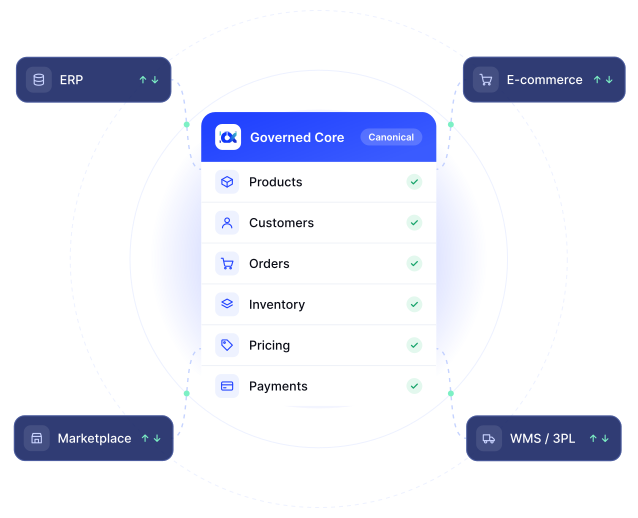
The Entity Model
Every entity, modeled once, with governance built in
OmnifiCX creates unified data models for the entities your commerce operations actually run on. Each one carries complete governance across every channel it touches, so the record you look at is the same one every system is acting on.

Products
A unified catalog with complete governance across all channels: one product record, however many places it's sold.

Customers
A single customer view across B2B, B2C, marketplaces, and retail, not a separate profile per channel.

Orders
Consistent order data from capture through fulfillment, so status means the same thing no matter which system you check.

Inventory
Real-time positions across all locations and channels: the count everyone sees is the count that's actually true.

Pricing
Synchronized pricing, promotions, and discounts, so the number quoted is the number that bills.

Payments
Unified payment and refund tracking, tied back to the order and customer record it belongs to.
Also governed
as first-class entities
Time to Value
Pre-built commerce data models mean no six-month implementations
A generic MDM tool starts from a blank schema: every entity, relationship, and validation rule has to be designed before it can hold real data. OmnifiCX starts from a schema already built for commerce, so the work that's left is connecting your systems to it, not inventing it from scratch.

Discovery workshops and schema design for products, customers, orders, and every other entity
Data modeling, field mapping, and validation rule-building, usually with a data engineering team
Migration, testing, and reconciling the records that didn't map cleanly
Still tuning entity relationships as new edge cases surface in production

Pre-built commerce data models are already in place: products, orders, customers, inventory, pricing, and more
Your systems are connected and mapped to the canonical entities that already exist
Governance rules are validated against your live data, not sample data
Production-ready: no data engineers required to keep it running day to day
Automated, Not Manual
Data quality rules run continuously, not in a batch job
Governance isn't a nightly cleanup script or a report someone reviews once a week. Every write is checked, standardized, and matched against the existing record before it's accepted, so the master data layer never drifts out of a governed state, even as multiple systems write to it at once.
Matching identifies when two systems are describing the same customer or product, so a duplicate is never created
Formats, units, and taxonomies are standardized on the way in, not cleaned up after the fact
Business rules are enforced as part of the write itself, so a malformed record never reaches the canonical entity
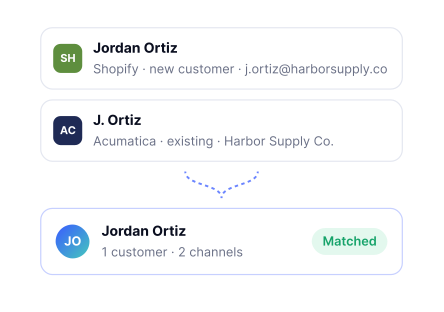
Customer Matching
A new customer record from any channel is matched against existing customers before a duplicate is created: one customer, one record, however many places they buy from.
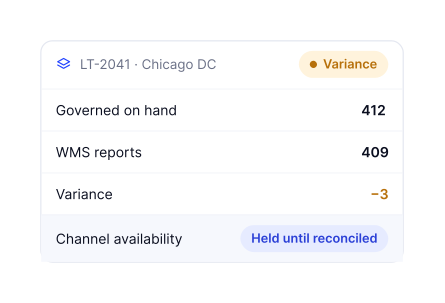
Inventory Reconciliation
A location's on-hand count is checked the moment it diverges from what a connected system reports, before it can oversell a channel.
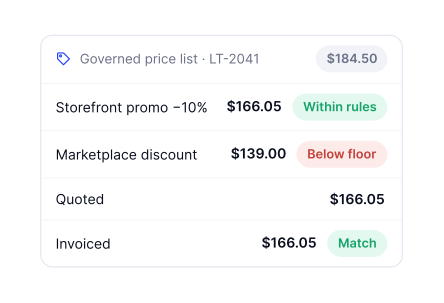
Pricing Consistency
Promotional pricing and discounts are checked against the governed price list before they reach any channel, so a quote and an invoice never disagree.
Every Record, Traceable
Every record carries its own history
Regardless of entity type, every record in the Governed Core includes the same standard fields: where it came from, how it syncs, and who changed it and when. That consistency is what makes it possible to see how any record reached its current state, without special-casing the question by entity.


Created from Acumatica ERP, channel: B2B

Bi-directional: reads from and writes to the Hub

2026-06-04, 09:12 by system sync

2026-08-19 14:37 by Ops user, via Storefront
Last Write Doesn't Win
Established values are protected
A connected system can fill a gap. It can't silently replace what's already there.
Once a value is established in the Governed Core, a later sync from another system cannot overwrite it. A blank field gets filled. A populated field stays as it is, and the attempted change is recorded against the record rather than applied to it.
This is the difference between a hub and a pipe. Middleware passes changes through in the order they arrive, so the last system to write wins, which is how a customer's middle name disappears because the ERP that received it has no field to hold one.
Current-state data still moves freely. Inventory positions, prices, order status, and shipping addresses are kept live across every connected system, because there the newest value is the correct one. It's identity and descriptive data (names, contact details, product content) that stays protected.

Protected
Names, contact details, and product content: once established, held. A conflicting sync is recorded against the record, not applied to it.

Always Live
Inventory positions, prices, order status, and shipping addresses: the newest value is always the correct one, so these stay in sync freely.
Full Version Control
Full version control and audit trails, on every record
Nothing overwrites a record silently. Every create and update is logged against the entity itself, so when a number looks wrong, the question "what changed, and when" has an answer already sitting on the record, not a support ticket someone has to investigate from scratch.
That's what makes day-to-day operation possible without a data engineer watching the pipeline: the record explains itself.
Record created from Acumatica ERP sync
Price updated - promotional discount applied from Storefront
Category reassigned by Ops user, manual override
Inventory synced from Warehouse Management system
Data Standards and Policies
One consistent format, however the data arrives
Naming, formatting, and mapping conventions decide how data from different channels gets translated into a single, understandable record in the Hub, so "navy," "2.3 kg," and "Lighting & Ceiling Fans" all land as the same governed value, wherever they came from.

weight_unit: "lbs"
category: "Home > Lighting"

Weight: "2.3 kg"
Category: "Lighting & Ceiling Fans"
weight_kg: 2.27
category_id: "cat_1042" (Lighting)
How This Connects
The Governed Core doesn't work in isolation
It's the foundation everything else on the platform builds on: the systems you connect to it, and the operations that run on top of it.
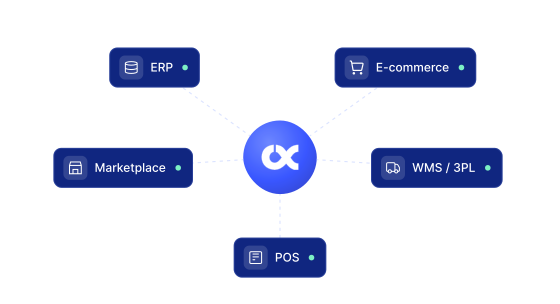
Connect Once, Connect All

Your systems connect to the Governed Core, not to each other. See how the hub architecture keeps every connected system in sync.
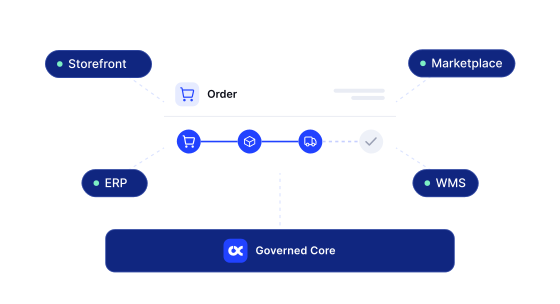
Governance in Production
Order Management runs natively on the Governed Core today: no separate order state to reconcile, because there isn't one.
Ready to run one governed operation?
See the Governed Core work against your own product, order, and customer data.
